What happened
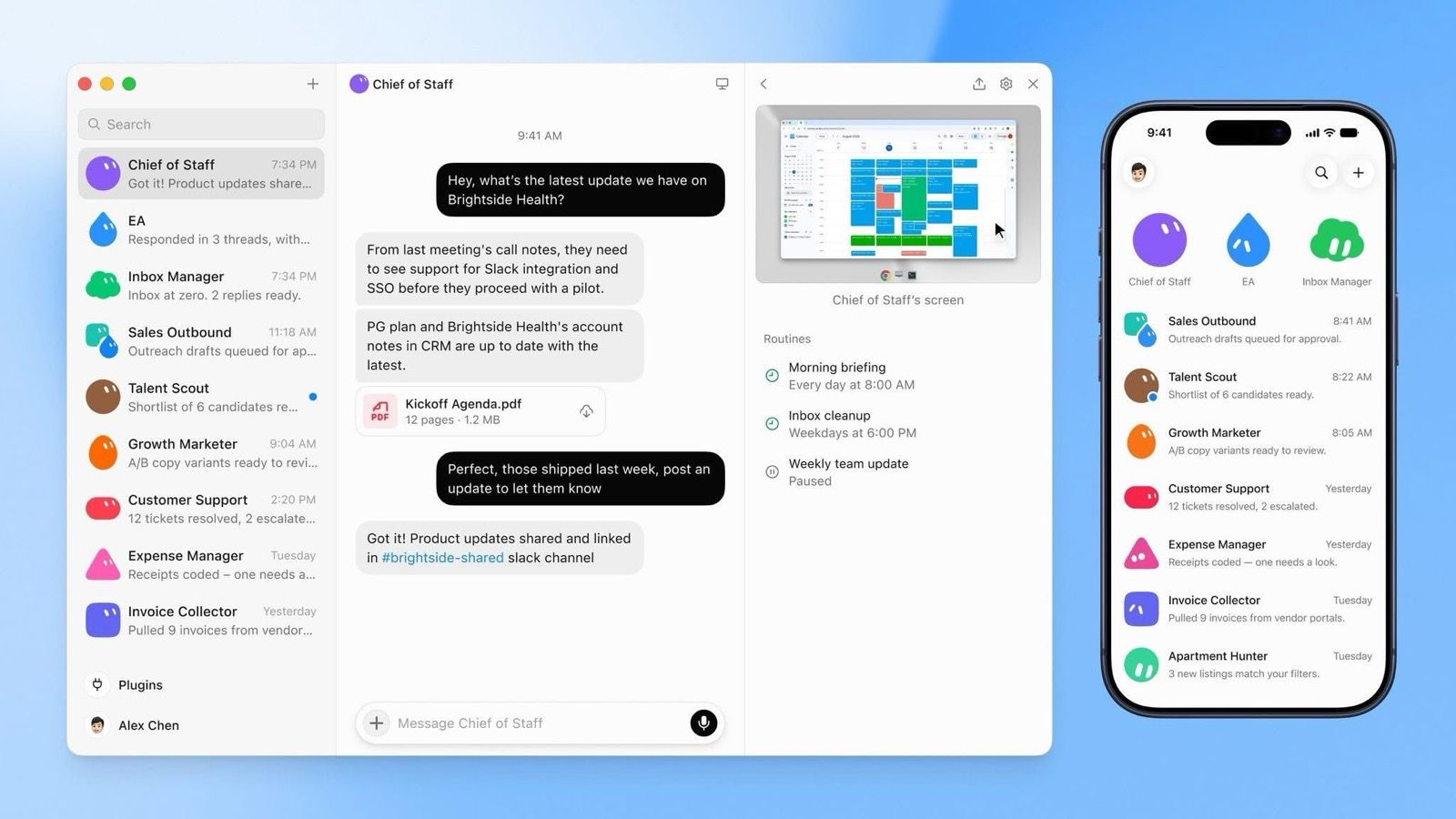
On 11 August 2026, xAI — now part of SpaceX, under the name SpaceXAI — launched Grok Bot in beta. It is not the Grok chat you may know from X. You create a Bot, give it a job and the logins it needs, and it works from its own computer in the cloud — including while your laptop is closed.
Who can get it: it launched bundled with SuperGrok Heavy and two Cursor plans (Cursor is the coding-tools company SpaceX bought). On 26 August xAI widened it to SuperGrok, SuperGrok Plus and every Cursor Pro, Pro+, Ultra and Teams plan. There are desktop apps for Mac, Windows and Linux, and mobile apps for iPhone, iPad and Android. Enterprise customers go to a waitlist.
On price, check xAI’s own page: it lists tiers from about $30 to $200 a month, while launch coverage also cited $120 per seat for Cursor Premium Teams and $300 for SuperGrok Heavy. Since 26 August a Bot’s work no longer counts against your Grok or Cursor plan usage, but it has its own limits, shown as relative tiers rather than numbers, so the real cost depends on how busy you keep it.
What's actually new
Three things set it apart from a chatbot, and all three are about doing, not answering.
It works inside the apps the way a person does
A Bot signs into your apps and websites and clicks through them. It does not need the software to offer a connection to AI, so it also reaches the old portal your supplier makes you use.
Show it once, and it becomes a routine
You can demonstrate a workflow and Grok Bot saves it to run later, then correct it over time. Bots also reportedly remember how you write and which edge cases you care about.
Several Bots can work as a small team
Team Bots can share a thread, message each other and hand work over. xAI's demo had a “Chief of Staff” Bot above specialist ones for the inbox, recruiting and expenses.
The pattern under all three: the AI is no longer a window you talk to. It is a worker with a login, a desk and a to-do list that you check on.
How it helps a small or mid-sized business
The jobs that fit span several apps, repeat on a schedule, and end with something you can check in a minute.
- Supplier invoices into one sheet. 30 PDFs arrive by email across the month; the totals, dates and invoice numbers need to land in a single table for your accountant.
- The weekly ad check. Three ad accounts, three dashboards, ten minutes each — turned into one short summary on Monday morning.
- Receipts and expenses. 60 receipts a month photographed, matched to the card statement, with the mismatches flagged.
- Account health. Of your 40 business customers, which ones have not ordered in 60 days — drafted as a short list, with a follow-up note waiting for your approval.
- Lead research. 50 companies from a trade-show list, each with a website, a size and a name to contact.
All of these happen behind the business, and the drafts wait in an approval queue instead of going out on their own.
What it doesn't change
The announcement is quietest about exactly these points.
You do not know which AI is doing the work
The model is not named and is chosen automatically behind the scenes. You cannot pick or pin it, so you cannot trade cost for quality. An early tester said the routing was not good at first; he was later told it improved. No agent benchmarks were published.
Cost is hard to predict
Because limits are relative, a routine that runs every hour can eat a lot of allowance. One roundup quotes Cursor warning that an hourly routine can use a week of usage in a day.
Bots on one account may share a computer
The launch page says each Bot has its own computer. xAI's own documentation says the Bots on an account share one, and that this is not a security boundary. Treat everything one Bot can see as visible to all of them.
It is not for your customers
xAI’s docs describe desktop and mobile apps, group chats, and tagging @bot on X. WhatsApp is not mentioned. Even if it were, a worker logged into your accounts is not what you want answering the public.
What to do this month
If you are not already on one of the plans, do not buy one for this. If you are, the experiment below costs an afternoon.
- Pick one weekly chore that crosses at least two apps and that nobody enjoys. One.
- Make a separate login with limited permissions for the Bot. Never your owner account.
- Show it the chore once, on the messiest week you have, rather than describing it.
- Check the first three runs line by line. If you cannot face checking it, that chore is the wrong one.
- Look at usage after a week before deciding if it is worth the monthly price.
Ask this before any login: what is the worst thing it could do with this account? If the answer is bad, it needs a narrower account, not more trust.
How to read the next announcement
There will be another launch within months. Four questions get you to the answer that matters faster than any coverage of it.
- Can I actually get it, and on which plan? A large share of every launch is either unreleased, sitting behind a tier above the one you pay for, or closed in your country.
- What can it do that the last one couldn't? Test scores almost never change your week. “Keeps working when your computer is off” does.
- How fast, and how much? Those two numbers alone decide whether it can go anywhere near a customer, or only near your back office.
- What did they not say? The limitations are always the shortest section in the announcement and the most useful one in it.
Most AI announcements change nothing for a small business in the month they land. That is the normal outcome, not cynicism. The ones worth your afternoon are the ones that take a specific job off your desk — and you will usually recognise them by how boring that job is.
Where AssistantLabs fits
Grok Bot is a worker for the back office. It is not meant to be the one who answers your customers.
These agents work for you. Your customers talk to someone else.
An agent like this sits on the owner's side: your inbox, your calendar, your spreadsheets. When a customer writes on WhatsApp at 22:40 and asks whether the item is in stock, none of them is documented as the one answering. That is sensible — whatever answers customers in your name should not also hold the keys to everything you own.
What an agent that talks to customers needs instead
- To know only your business — catalog, prices, FAQ, opening hours. Not your inbox, not your accounts.
- To work where customers already write — WhatsApp, Instagram, email, website chat — in their language.
- To hand over to a person when it should, and record what is still open.
- To start muted and only answer once you have seen how it handles real questions.
They complement, not compete. You can connect your AssistantLabs workspace to Claude or ChatGPT and ask about your customers' conversations. What we have not confirmed: whether Duet or Dots can use a connection like that at launch — check before you rely on it.
If you want an agent that answers customers on AssistantLabs, the guide to getting your agent live in 3 weeks walks through it step by step.