What happened
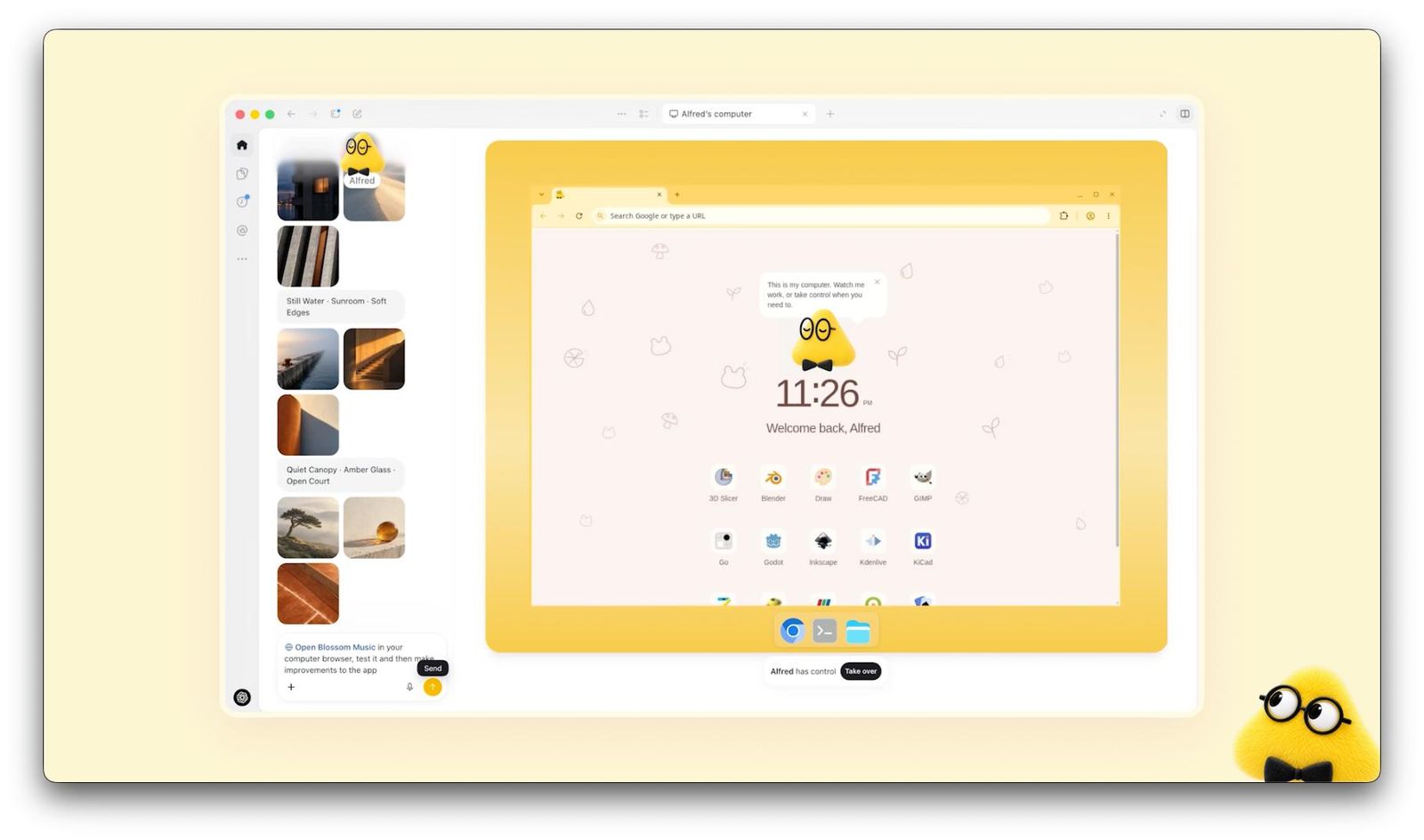
On 29 September 2026, at its DevDay event, OpenAI announced Dots: agents that live inside ChatGPT and keep working after you close the chat. You name your first Dot, tell it what to watch over, and it comes back with finished work for your approval. It runs on GPT-6 Astra — the model we covered in an earlier item.
Who gets it: OpenAI says the first Dot is included with ChatGPT Pro and Business Premium. On Enterprise, Edu and Healthcare plans an administrator has to switch the beta on, and it is off by default. Free, Go and Plus do not include it. Several reports add that Pro launched without the EEA, Switzerland and the UK, while Business Premium customers there do get it.
On price, third-party reports put ChatGPT Pro at $100 to $500 a month depending on the tier, and Business Premium at about $100 per user on an annual contract. OpenAI has not published what extra Dots cost, or how much work each plan allows.
What's actually new
Three changes matter to an owner, and the third is the one OpenAI spent the most words on.
It has its own computer and browser, and 4,000+ apps
Each Dot gets a cloud computer and browser, and connects to more than 4,000 apps through ChatGPT's plugin system. It keeps several projects moving at once and gradually learns your preferences.
You reach it where you already work
Through ChatGPT on mobile and web, and through Slack and Microsoft Teams. Texting is described as coming. WhatsApp is not mentioned.
A control layer you can read
Custom Rules let you allow an action, require your approval, or forbid it. Activity View shows what it did in the background. Auto-review checks consequential actions against your instructions before they go out. Changing passwords stays with you, and on supported sites it can use a saved login without the model seeing the password.
The pattern under all three: the new thing is not that the AI is smarter. It is that someone finally built the part where you stay in charge of an AI that acts.
How it helps a small or mid-sized business
OpenAI's own examples are mostly for developers. These are the ones that fit a business with a few employees.
- The unpaid-invoice chase. Every Monday: pull the 12 invoices past due, draft a polite reminder for each, and wait for your OK before anything is sent.
- A proposal that stays current. The price list changed on 40 items; the three open proposals get updated copies to review.
- Competitor watch. Ten competitor pages checked weekly, with a one-paragraph note on what changed.
- Content from a recording. A 40-minute video in, a draft of show notes and five social posts out.
- Launch material that follows the product. When the product page changes, the email and the FAQ draft change with it.
Every one of these ends in a draft that you read. That is the shape Dots is built around.
What it doesn't change
Several of the most useful facts are in the small print.
Work counts against your plan
Talking to a Dot does not use your allowance, but the work it does does. Reports say extended limits apply for the first month; after that the work counts. OpenAI has not published the numbers.
One Dot per person, for now
Teams of specialist Dots, each with its own credentials, are described as an enterprise pilot. A standard multi-Dot plan is not on offer yet.
It can still be wrong, and it launched under a cloud
OpenAI itself says Dots can make mistakes and to review consequential work. The launch came a day after the company said it had held back another system over safety concerns, which is why coverage asked safety questions.
It is for you, not for your customers
Its home is ChatGPT, Slack and Teams. A reply to a customer who wrote on WhatsApp at night is not what it was built for, and giving it that job would mean giving a customer-facing process the same access you gave your own helper.
What to do this month
If your plan already includes a Dot, set it up in this order.
- Write Custom Rules before the first task. Start with “ask me before sending, paying or deleting”.
- Give it a read-only first job — a weekly summary of one inbox or one spreadsheet.
- Open Activity View after each run for the first two weeks.
- Add one app at a time, not the whole list.
- Compare the hours saved with the hours spent checking before upgrading anything.
If you are on Plus: do nothing. You lose nothing by waiting for the allowance and extra-Dot prices to be published.
How to read the next announcement
There will be another launch within months. Four questions get you to the answer that matters faster than any coverage of it.
- Can I actually get it, and on which plan? A large share of every launch is either unreleased, sitting behind a tier above the one you pay for, or closed in your country.
- What can it do that the last one couldn't? Test scores almost never change your week. “Keeps working when your computer is off” does.
- How fast, and how much? Those two numbers alone decide whether it can go anywhere near a customer, or only near your back office.
- What did they not say? The limitations are always the shortest section in the announcement and the most useful one in it.
Most AI announcements change nothing for a small business in the month they land. That is the normal outcome, not cynicism. The ones worth your afternoon are the ones that take a specific job off your desk — and you will usually recognise them by how boring that job is.
Where AssistantLabs fits
Dots is a helper for the person who owns it. It is not meant to be the one who talks to your customers.
These agents work for you. Your customers talk to someone else.
An agent like this sits on the owner's side: your inbox, your calendar, your spreadsheets. When a customer writes on WhatsApp at 22:40 and asks whether the item is in stock, none of them is documented as the one answering. That is sensible — whatever answers customers in your name should not also hold the keys to everything you own.
What an agent that talks to customers needs instead
- To know only your business — catalog, prices, FAQ, opening hours. Not your inbox, not your accounts.
- To work where customers already write — WhatsApp, Instagram, email, website chat — in their language.
- To hand over to a person when it should, and record what is still open.
- To start muted and only answer once you have seen how it handles real questions.
They complement, not compete. You can connect your AssistantLabs workspace to Claude or ChatGPT and ask about your customers' conversations. What we have not confirmed: whether Duet or Dots can use a connection like that at launch — check before you rely on it.
If you want an agent that answers customers on AssistantLabs, the guide to getting your agent live in 3 weeks walks through it step by step.